
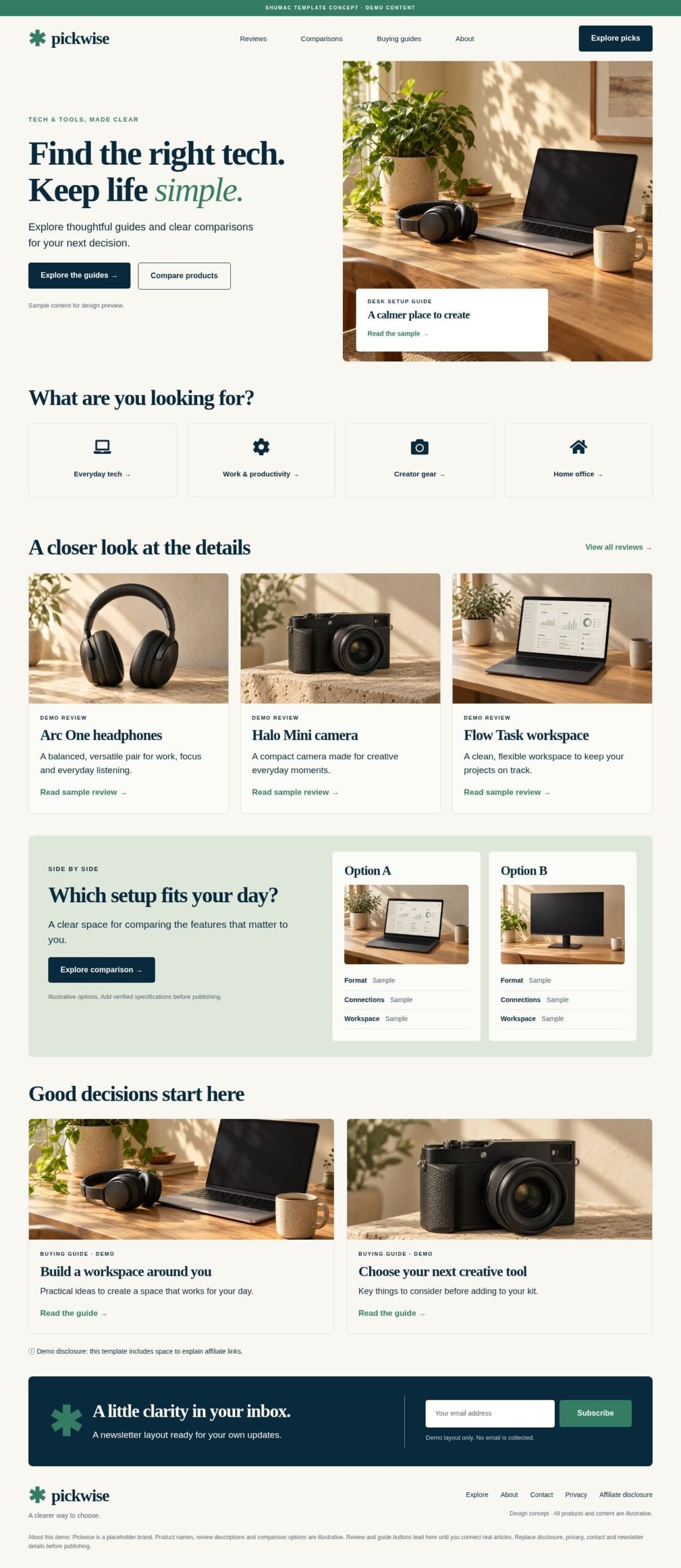

Description
Plugin installer version in preparation
1 draft page and 5 bundled media items. Real WordPress import testing pending. This new installer has passed offline static and PHP mock checks only. It has not been installed, imported or browser-rendered in a real WordPress/Elementor site.
Planned setup: Plugins → Add New → Upload Plugin → Activate. Then open Tools → Pickwise Import, review the requirements, select the confirmation checkbox and choose Import kit. Activation alone imports nothing. The importer is designed to create new drafts, add the bundled media to the local Media Library and map the page assets and declared internal links.
Requirements and limits: Elementor Free with Containers. Article links and the newsletter row remain demos; no email collection or affiliate backend is configured.
Review every imported page in Elementor on desktop, tablet and mobile before publishing. Existing pages, homepage and global styles are not overwritten. Media may be publicly reachable while pages remain drafts.
This installer candidate is not the current customer download. Existing purchase downloads still deliver the original package described below. Earlier testing and manual-import notes refer to that original package, not the new installer.
Pickwise is an editable single-homepage template for an affiliate-style tech and tools publication. Its sage, cream and ink palette pairs an editorial serif with clear comparison and buying-guide sections.
View the homepage image preview
Included in your download
- One complete HOME page JSON with nine independently editable top-level Flexbox Containers, including its on-page header and footer.
- 151 native Elementor elements: 58 containers and 93 Free widgets. No Elementor Pro, HTML widget, custom CSS or addon is required.
- Five optimized WebP illustrations, original PNGs, desktop and mobile previews, and validation reports.
- An offline image-URL preparation helper, a three-page PDF setup guide and detailed text instructions.
Requirements and import
Requires WordPress, Elementor Free with Flexbox Containers and a compatible theme. Hello Elementor and Elementor Canvas are recommended. This is a manual JSON delivery bundle, not a one-click Website Kit, theme or plugin. Unzip the bundle, upload the five WebP images to your Media Library, paste their URLs into PREPARE-TEMPLATE.html, then import the prepared JSON through Elementor Saved Templates. You can instead select the uploaded photos in the eight Image widget placements.
Scope and demonstration content
This purchase contains one homepage. Separate article pages, global header/footer templates, a search engine, affiliate tracking, ecommerce and a working newsletter integration are not included. Review and guide buttons lead to a demo explanation. The newsletter row is a visual layout and collects no email. Replace all demonstration destinations and add your chosen form integration before launching your own site.
Pickwise, product names and comparisons are fictional demonstration content. The included AI-generated illustrations are not evidence of real products, product testing or endorsements. Add verified article content, your commercial disclosures, privacy information and working links.
Download access
The image preview is public. The ZIP is delivered through your Shumac account after payment, using protected WooCommerce downloads.
Reviews
There are no reviews yet.